
DSD Explained DSD Explained
Overview
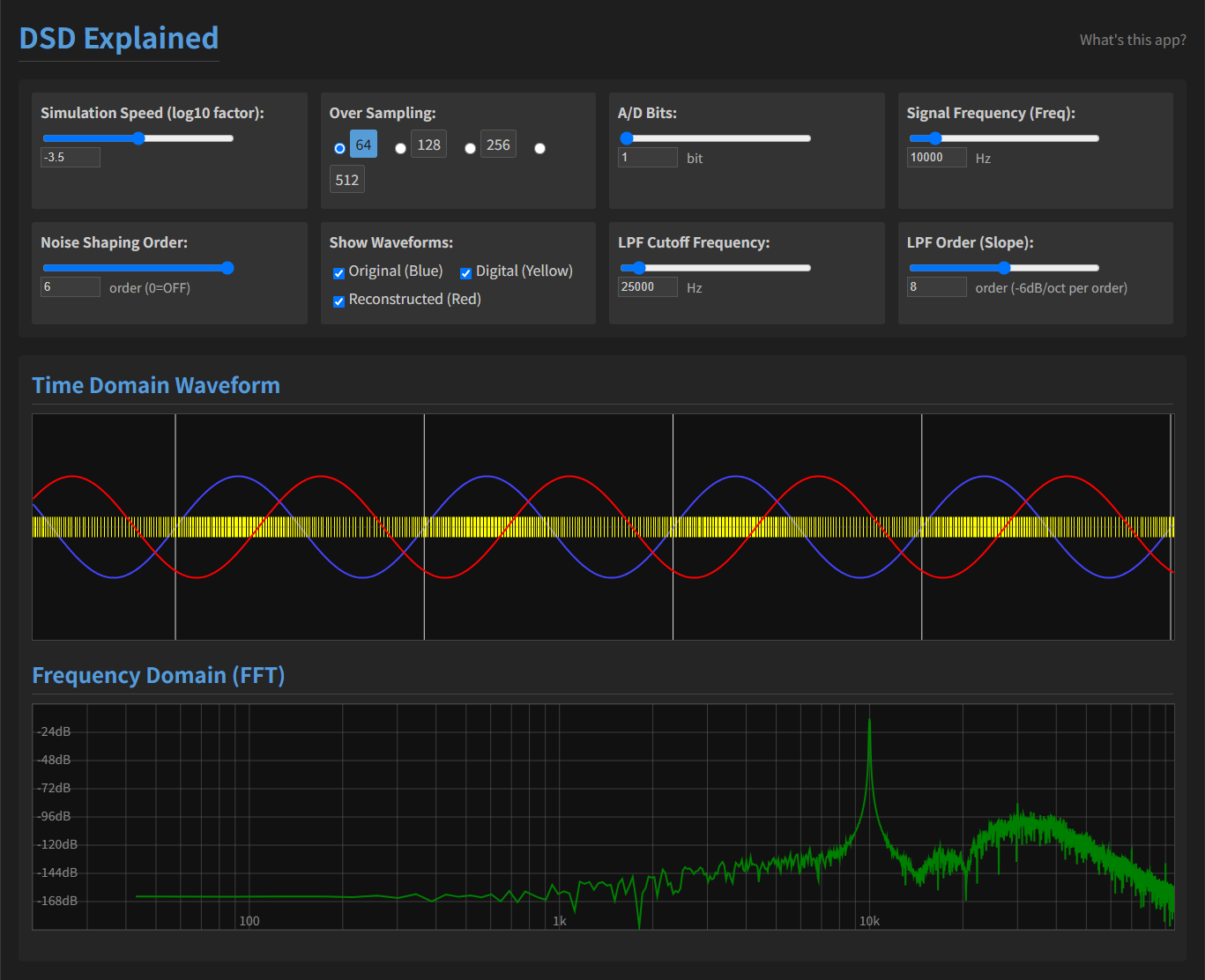
DSD Explained is an interactive web application that animates the process of ΔΣ modulation and reconstruction of audio waveforms at a slowed-down speed for easy understanding.
Launch the App
Features
- Real-time animation of Delta-Sigma and multi-bit ΔΣ conversion and reconstruction.
- Customizable sampling rate, bit depth, noise-shaping order, input frequency, and filter settings.
- Visual display of time-domain waveforms and real-time FFT spectrum.
- Adjustable playback speed for slow-motion observation.
Configuration Options
Speed
- Slider Range: -5 to -2 (step 0.1)
- Default: -3.5
Controls the slow-motion playback speed for visualization; this is a demonstration feature and does not correspond to any parameter in real AD/DA converters. Lower values produce slower animations, making it easier to observe detailed processing steps.
Oversampling Frequency
- Options: 64, 128, 256, 512
- Default: 64
Sets the oversampling ratio relative to 44.1kHz. In real ADCs this corresponds to the sampling rate setting; higher oversampling ratios spread quantization noise over a wider frequency range, reducing in-band noise. However, higher rates increase power consumption and circuit complexity. Doubling the oversampling rate typically improves SNR by about 3dB.
AD Bit Depth
- Slider Range: 1 to 6 bits
- Default: 1 bit
Specifies the quantization bit depth for PCM conversion. Each additional bit increases dynamic range by approximately 6dB in real ADC/DAC systems, reducing quantization noise but raising data rate and circuit complexity.
Signal Frequency
- Slider Range: 20Hz to 20kHz
- Default: 10kHz
Sets the generated sine wave frequency. In practice, adjusting the frequency tests the converter's frequency response and aliasing behavior.
Noise Shaping Order
- Slider Range: 0 (OFF) to 6 (integer steps)
- Default: 6
Determines the order of the ΔΣ modulator's noise-shaping loop. Higher orders push quantization noise further out of the audible band, lowering in-band noise; for example, second-order noise shaping can offer around 12dB lower in-band noise compared to first-order. Higher orders also increase loop complexity and stability considerations.
Waveform Display Toggles
- Options: Original, Digital, Reconstructed
Toggle which waveforms to display: Original is the input waveform; Digital is the quantized bitstream; Reconstructed is the filtered output.
LPF Cutoff Frequency
- Slider Range: 20kHz to 40kHz
- Default: 25kHz
Sets the cutoff frequency for the low-pass filter used in signal reconstruction. Lower cutoff removes more high-frequency noise but may attenuate the desired signal band, affecting audio fidelity.
LPF Order
- Slider Range: 0 to 16 (integer steps)
- Default: 8 (48dB/oct)
Defines the steepness of the reconstruction filter. Higher order yields steeper roll-off, improving noise rejection but potentially increasing phase distortion and circuit complexity.
概要
DSD Explained は、波形をΔΣ変調および再構築するプロセスを、学習しやすいようにスローモーションでアニメーション表示するインタラクティブなウェブアプリケーションです。
アプリを起動
特徴
- ΔΣおよびマルチビットΔΣ変調と再構築のリアルタイムアニメーション
- サンプリング周波数、ビット数、ノイズシェーピング次数、入力周波数、フィルタ設定をカスタマイズ可能
- 時間波形とリアルタイムFFTスペクトルを視覚的に表示
- スローモーション観察のための再生速度調整機能
各設定項目の解説
速度設定
- Slider Range: -5 to -2 (step 0.1)
- Default: -3.5
学習用スローモーション表示の速度を調整します。値が小さいほどアニメーションが遅くなります。実機のAD/DA変換には影響せず、観察用デモ機能です。
オーバーサンプリング周波数
- Options: 64, 128, 256, 512
- Default: 64
サンプリング・レートを44.1kHzの何倍で行うかを設定します。実機のADCではサンプルレートに相当し、高いオーバーサンプリング比は量子化ノイズを広帯域に分散し、SNRを改善します(2倍で約3dB向上)が、消費電力や回路の複雑化を招きます。
ADビット数
- Slider Range: 1 to 6 bits
- Default: 1 bit
アナログ信号の量子化ビット数を設定します。ビット数が増えるごとにダイナミックレンジは約6dB向上し、量子化ノイズが減少しますが、データ量と回路複雑性が増加します。
信号周波数
- Slider Range: 20Hz to 20kHz
- Default: 10kHz
テスト信号の周波数を設定します。実機では周波数特性やエイリアシングの影響を評価するために使用します。
ノイズシェーピング次数
- Slider Range: 0 to 6 (integer steps, 0=OFF)
- Default: 6
ΔΣ変調器のノイズシェーピング次数を指定します。高次数ほどインバンドノイズが低減(例:2次で1次比約12dB低減)しますが、ループ安定性と実装の難易度が上がります。
波形表示切り替え
- Options: Original, Digital, Reconstructed
表示する波形を切り替えます。Originalは入力波形、Digitalは量子化ビットストリーム、Reconstructedは再構成後の出力波形です。
LPFカットオフ周波数
- Slider Range: 20kHz to 40kHz
- Default: 25kHz
再構成フィルタのカットオフ周波数を設定します。低くすると高周波ノイズ除去が強化されますが、信号帯域まで影響する可能性があります。
LPF次数
- Slider Range: 0 to 16 (integer steps)
- Default: 8 (48dB/oct)
再構成フィルタの次数を設定します。高次数ほど急峻なロールオフになりますが、位相歪みや回路コストが増大します。